A contact form that posts only name, email, and message
The form was never told which page it lives on, so the listing behind the inquiry is not part of what it sends.
By WebGrowlyUpdated
A name, email, and phone number tell you who reached out. A useful lead record also shows which property, search, or question prompted the inquiry, so you can respond without making the lead repeat themselves.
Besides the name and the contact, a connected real estate website can send six things with the lead: the source path, the listing or address, the search criteria, the message or conversation, the language, and the earlier activity on the site. This guide shows which of them each of the five ways of reaching out carries, how to check what yours sends today, and why the details usually go missing on the way.
See what sparked the inquiry
Keep the property or question attached
Start with something specific
As a lead usually arrives
Field by field
Five ways a visitor reaches out, six things the record can carry besides the contact. This is what a WebGrowly website connected to WebGrowly OS can carry into the lead record when the visitor takes that path.
| How the visitor reached out | Source path | Listing or address | Search criteria | Message or conversation | Language | Earlier activity |
|---|---|---|---|---|---|---|
| Listing inquiry | Source path: Can be carried with the lead | Listing or address: Can be carried with the lead | Search criteria: Carried when the visitor provides it | Message or conversation: Can be carried with the lead | Language: Carried when the visitor provides it | Earlier activity: Carried when the visitor provides it |
| Saved search or buyer portal | Source path: Can be carried with the lead | Listing or address: Carried when the visitor provides it | Search criteria: Can be carried with the lead | Message or conversation: Carried when the visitor provides it | Language: Carried when the visitor provides it | Earlier activity: Carried when the visitor provides it |
| Home valuation request | Source path: Can be carried with the lead | Listing or address: Can be carried with the lead | Search criteria: Not part of this path | Message or conversation: Carried when the visitor provides it | Language: Carried when the visitor provides it | Earlier activity: Carried when the visitor provides it |
| AI assistant conversation | Source path: Can be carried with the lead | Listing or address: Carried when the visitor provides it | Search criteria: Carried when the visitor provides it | Message or conversation: Can be carried with the lead | Language: Carried when the visitor provides it | Earlier activity: Carried when the visitor provides it |
| General website form | Source path: Can be carried with the lead | Listing or address: Not part of this path | Search criteria: Not part of this path | Message or conversation: Can be carried with the lead | Language: Not part of this path | Earlier activity: Carried when the visitor provides it |
Listing inquiry
Saved search or buyer portal
Home valuation request
AI assistant conversation
General website form
What arrives depends on how the visitor reached out and what they chose to share. Anonymous browsing stays anonymous until the visitor identifies themselves.
Ten-minute check
You do not need a sales call to find out. Send yourself a lead and read the record the way a stranger would.
About ten minutes for one path. Repeat it for a saved search and a valuation request if your site offers them.
Use a listing you know well, so you can tell at a glance whether the record names it.
Use a name you will recognize and ask a question that mentions the address, the way a real buyer would.
Your CRM, or the inbox if that is where inquiries go today. Do not look at the listing page again.
Go down the six columns for the listing-inquiry row and mark what the record actually shows.
It passes when
the record names the property and shows your question without you looking anything up.
It fails when
the record shows a name, an email, and a message and nothing else. The property stayed on the website.
Why the details go missing
None of these is a mistake by the visitor. Each one is a seam between two tools that were never told about each other.
The form was never told which page it lives on, so the listing behind the inquiry is not part of what it sends.
The search runs in another system. Unless that system is set up to hand the listing across, the property a visitor was looking at is not part of what the form on your site sends.
Whatever the email carried is reduced to what someone has time to copy across.
Some third-party leads arrive as a name and a phone number by design. No CRM can restore what was never sent.
Same lead. Two first messages.
The second message took the same minute to write. The difference is what the record carried.
From a name-and-phone record
Hi Maria, thanks for reaching out. How can I help?
You had a name and a phone number.
From a connected record
Hi Maria, you asked whether the two-bedroom with the water view allows short-term rentals. The building sets a thirty-day minimum. Want to see it this weekend?
You had the listing, the question, the source, and the language.
Both messages are written examples, not a customer's correspondence.
When the property, question, and source stay attached, you respond to what the lead already showed you instead of asking them to repeat it.
What reaches your CRM
Think about the lead record you actually receive after someone submits a form, asks about a property, or shares contact details. The five rows below group the six table columns above: the listing and the search criteria share one row. Mark only the information you can see in that record. Your selections stay in this browser and are not saved.
Start with the basics
Name and at least one way to reply
Assume every lead already includes an email address or phone number. Now mark what else arrives with it.
Choose the kind of inquiry you want to check
A buyer asks about a listing or requests a showing.
Most useful detail to preserve next
Keep the exact listing, property address, or search criteria attached to the lead record.
What this lead record lets you do
A record may be ready for a property-specific reply while still losing the conversation, language, or source. The results show exactly what you can do and where the handoff still breaks.
The record has no property, search, question, or visible buyer activity to reference.
Nothing in the record shows what the lead viewed, saved, or asked before reaching out.
The record does not show the lead's language or any property-related interest.
You cannot tell which form, listing action, valuation request, or website path generated the lead.
Four questions
A record can be strong in one area and weak in another. This check separates the outcomes instead of turning five different fields into one score.
A property, search, question, or visible interest gives the first response a real subject.
The message and activity history keep the client from having to start over.
The language and the visible interests shape a reply that fits the person.
The form, listing action, or conversation that started it shows which website paths bring real conversations.
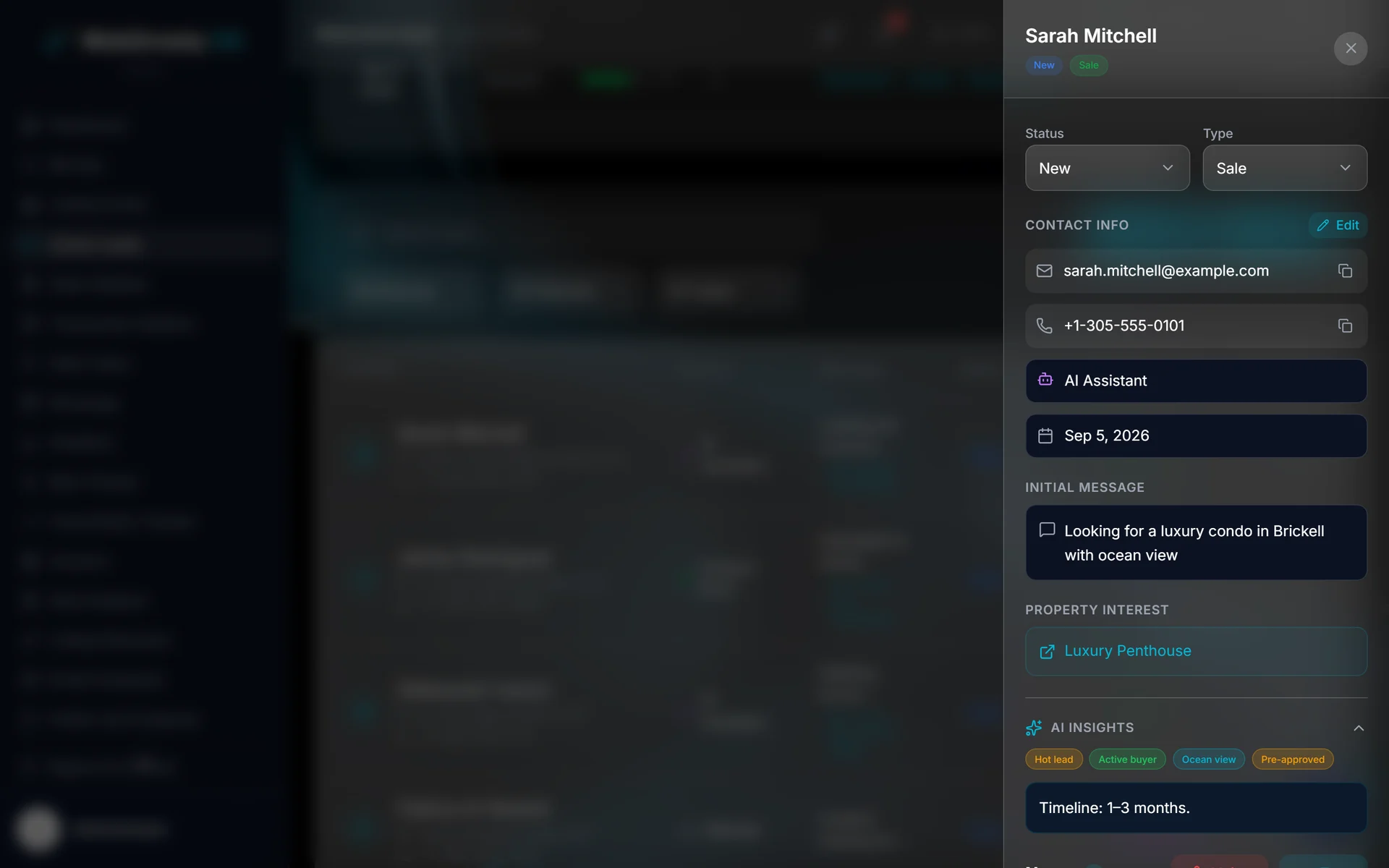
How WebGrowly keeps it attached
When a visitor shares their contact details through a WebGrowly form, a property inquiry, a buyer account, or the AI assistant, the property, search, question, and source can reach the matching lead record instead of staying behind on the website.
The lead record can show which form or request started the inquiry and include the details the visitor submitted.
An inquiry can stay connected to the exact listing, saved home, or search that prompted it.
When a visitor shares contact details in the assistant, the conversation can continue in the matching lead record.
Saved homes and saved searches can stay connected when the buyer signs in or creates an account.
Built into the one payment
What lands in the record is what the visitor showed or typed on the site, so the set of filled rows differs from one inquiry to the next. Anonymous browsing stays anonymous until the visitor identifies themselves.
Questions
At minimum, a name and one way to reply. A WebGrowly website also sends the listing or saved search behind the inquiry, the visitor's message or assistant conversation, and the form that started it; valuation requests add the visitor's language. The table above shows which of these each entry path carries.
Only when the search and the form belong to the same system. With WebGrowly's built-in MLS search, the listing a visitor asks about can stay attached to the lead. When the search runs on a separate subdomain or inside a frame, whether the listing reaches your CRM depends on what that system is set up to send.
A WebGrowly lead record can show the form, listing action, valuation request, or assistant conversation that started it, so you can compare which parts of the site bring real conversations.
Anonymous browsing stays anonymous. Saved homes, saved searches and recent views join a lead record when the visitor signs in or creates a buyer account; a form or assistant conversation sent with the same email lands in that same record.
When a buyer signs in or creates an account, their saved homes and saved searches can stay connected to the lead record, so the follow-up can start from what they already chose.
Sources
The three figures at the top of this page are read from the National Association of REALTORS® 2025 Technology Survey, fielded in July 2025 and published in September 2025: 49,233 members invited, 1,241 responses, a 2.5% response rate. On the same question 39% named social media, 17% the local MLS and 13% their brokerage website. Everything else on the page describes WebGrowly's own product.
Figures used on this page
See it on your own forms
In a live demo, we can review your forms, property inquiries, and what buyers save or view in their accounts, then show exactly what WebGrowly carries into the CRM.
$499 one time for the website, the built-in MLS search, and WebGrowly OS. No monthly WebGrowly fee.
Two routes to the real product: the live public website and the WebGrowly OS demo open in a new tab.